
POS
Manager Functions Enhancements
We have made several enhancements to the Manger Functions Screen, including:
- Added the “Device Info’ button to the ‘Administration’ category:

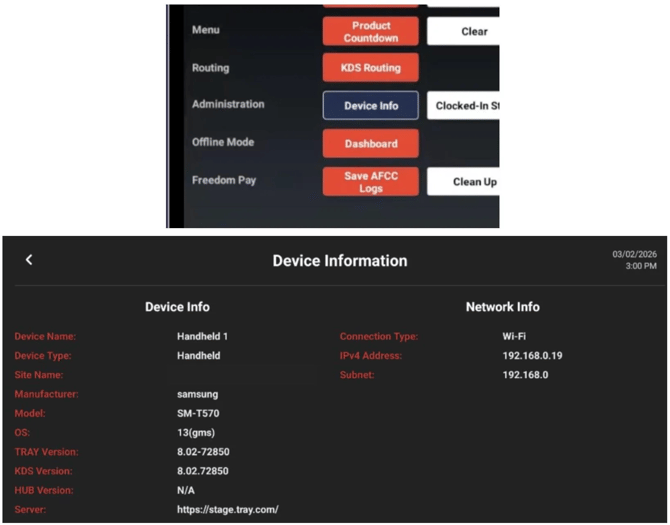
- Removed the ‘App Log Upload’ button, as it is no longer necessary
- Clear access indicators - Red buttons indicate buttons available to staff and white buttons are available only to managers:
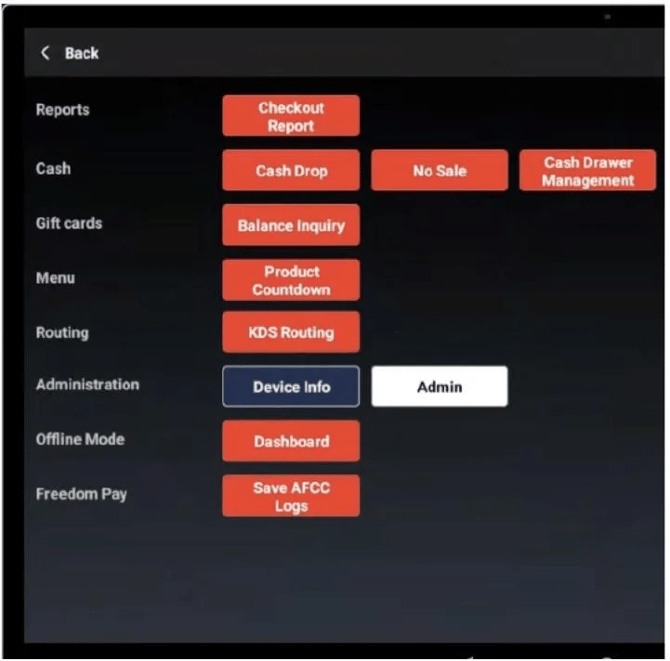
Staff View
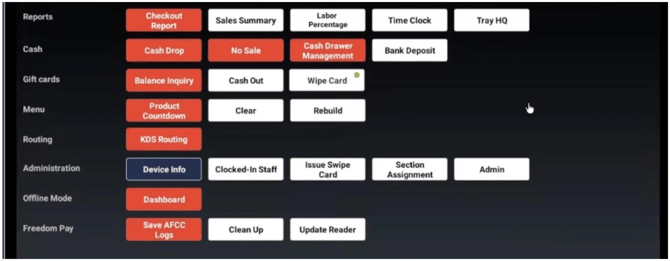
Manager View
- We have moved the ‘Checkout Report’ to the top of the available printed POS Reports list
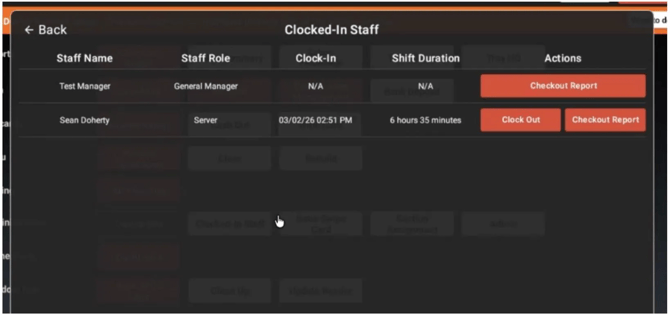
- Added the ‘Clocked In Staff Button’ as a new screen to help managers have a better idea of how long staff members have been on the clock and the details of their shift:

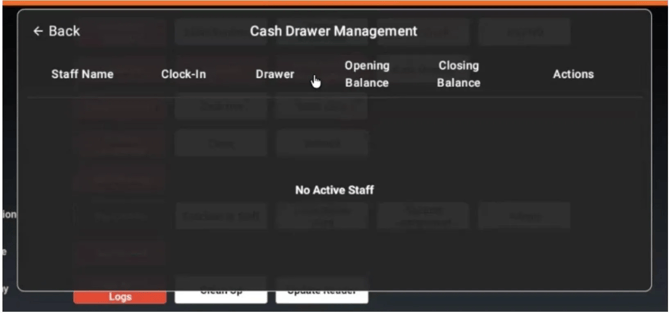
- Enhanced the Cash Drawer Management UX:
Connectivity Banners on Small Form Factor
Connectivity messaging has been improved on small form-factor devices (including the login screen)
Stale Data Sync Prompt
Devices now provide prompting when data becomes stale and manual synchronization is needed. The ‘refresh’ icon on the devices will now flash red when the device data is out of sync.
KDS
QSR Mode (MVP)
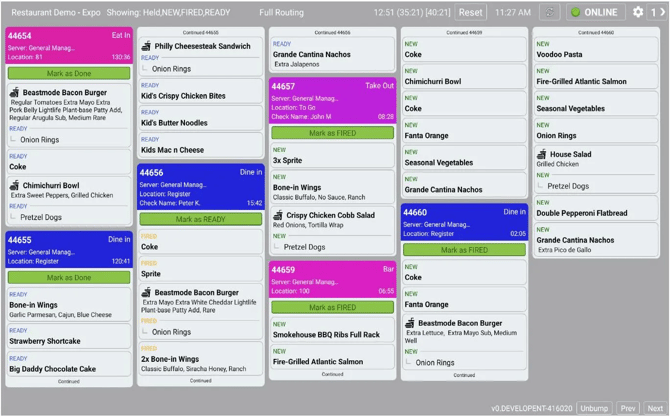
Introduced a new QSR-focused KDS mode with an updated Expo user experience and interaction model.

Item Level Routing Enhancements - Exclude From Routing and Expo Behavior
Enhanced Item Level Routing (ILR) with new “Exclude From Routing” support, including full end-to-end configuration and data handling. This release adds the underlying database support for an exclude flag, server-side UI updates to manage the setting at both the Site and Node levels, and API/menu payload updates so the exclude status is available to downstream clients (including ensuring the flag is present for product modifiers in menu responses). ILR was also updated to honor the exclude configuration for online orders, ensuring the routing behavior is consistent regardless of origination channel.
In addition, Expo workflow behavior was refined by introducing auto-advance of Expo-routed items and correcting routing state transitions that could incorrectly move orders directly to ‘Ready’ rather than the initial routed state.
Remote Printing and Failover for Time Entry Chits and Other Receipts
Extended remote printing and failover coverage for labor/time-entry chits and key receipts (including bank receipts). This improves operational continuity when primary printers or print paths are unavailable, and resolves cases where receipts could fail to print for staff with multiple roles.
Integrations
Deliverect Integration Enablement and Certification
Delivered Deliverect integration functionality and certification updates, including improved order status updates, channel-based tender/payment mapping, and support for out-of-stock (product snoozing) signaling. Multiple fixes address receipts, customer address printing, order notes, scheduled order timing, refunding, and report/KDS labeling to ensure consistent digital-order handling end to end.
HQ
Inventory Enhancements - Reporting & Waste Management
Introduced and expanded Inventory reporting (Stock on Hand, Inventory Movement, Purchase Orders, COGS, and Inventory Variance) alongside Inventory Count/Waste workflows in HQ. Depletion logic and reporting were hardened-especially for offline scenarios and comp/return-to-inventory behaviors-so stock levels and movement history remain accurate after sync. Permissions and tab access were also corrected to prevent unintended access to unrelated configuration areas.
Tender Publish Configuration Improvements
Tender type configurations / changes can now be published separately from Site Settings. This can be done either via a manual or scheduled publish.
Tax Configuration Guidance for New Menu Categories
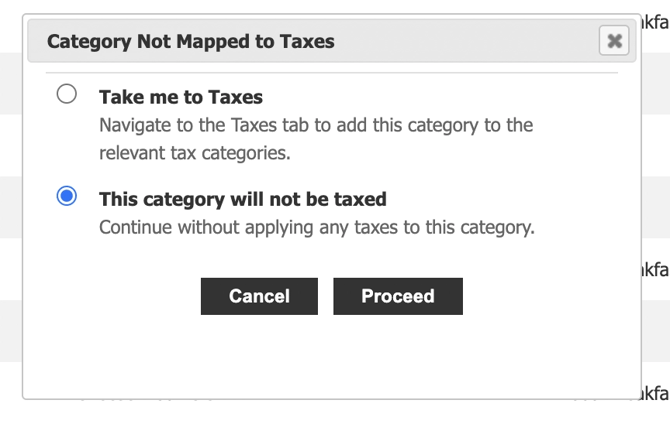
Added user guidance to help ensure newly created menu categories are mapped to appropriate tax categories. This reduces configuration oversights and prevents tax-related inconsistencies during menu rollout.
Category Not Mapped to Taxes
Added user guidance to help ensure newly created menu categories are mapped to appropriate tax categories. This reduces configuration oversights and prevents tax-related inconsistencies during menu rollout
HQ Server Checkout Report Performance Optimization
Optimized HQ Server Checkout Report generation to improve performance and reliability under higher data volumes and longer reporting windows.
Report Adjustments
Reporting updates include:
- removing the ‘Adjustments’ column from the HQ ‘By Category’ report
- correcting PDF export alignment issues for the HQ ‘By Category’ report after removing the adjustments column
- aligning service ordering between the HQ Daily Sales Report (DSR) and printed outputs, including the Printed Sales Summary and Server Checkout Report (SCR) Services ordering
Several reconciliation and calculation issues were addressed, including:
- resolving discount total discrepancies between the HQ Daily Sales Report (DSR) and the HQ Financial Management Report
Additional Bug Fixes
Order Editing Stability - Split Item Duplicate State Prevention
Resolved an order editing issue where splitting items after an order was placed could result in duplicate item states/entries appearing on the check, causing inconsistent item representation.